Shelly 1 Gen3 Wi-Fi Relay Switch
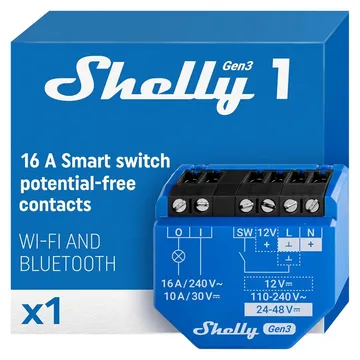
A 16 A relay with dry contacts that fits behind a wall switch. Matter over Wi-Fi brings Apple Home, Alexa, Google Home and SmartThings in, with no hub.
Works with


Features
Features by hub: support differs between Apple Home, Home Assistant and others.
About
A one-channel relay module for a wall box or junction box, rated 16 A and able to switch dry contacts. Gen3 adds Matter, so a Matter controller drives it over Wi-Fi without the Shelly cloud.
Pairing
About 2 minutes. Add the device in the app or web interface for your hub.
- Open the Home app, tap +, then Add accessory.
- Scan the Matter code from the device or its app, or enter it by hand.
- Pick a room and give the device a name.
- Go to Settings → Devices & services and choose Add integration.
- Search for HomeKit Controller and enter the code from the device or its app.
- Assign the device to an area.
- Open SmartThings, tap +, then Add device.
- Choose Matter, then scan the code from the device or its app.
- Pick a room and give the device a name.
- Open the Google Home app, tap +, then Set up device.
- Choose New device, then scan the Matter code from the device or its app.
- Pick a home and a room, then give the device a name.
- Open the Alexa app, go to Devices, then tap +.
- Choose Add device, then Matter, and scan the code from the device or its app.
- Add the device to a group and give it a name.